
Switches and Variables - All Tied Together
- meetthemeese

- Dec 29, 2020
- 6 min read
Updated: Oct 6, 2022
[WARNING: Image-heavy post]
As promised, here's how to limit the number of times the well from the last post tries to kill Chester, plus an example that uses both switches and variables to see how the two can come together for scenarios that are typical in RPGs.

Well, Well
I'll be using a variable to limit the number of murder attempts from the haunted well to 2. So for that, I'll need another variable in addition to the one that holds the damage amount.
1. Click on the healing/damage-causing event (in my case, it's the well) and create a new variable. I'm going to call it CursedWlAttempts. Set the variable to 'Add' 1 at the end of all the commands that are already there (remember, all variables are 0 by default until you set/manipulate them yourself).

We thus have our counter variable set up. Every time Chester interacts with the event, the variable value will increase by 1, thus keeping a count of how many times he's clicking on the well.
2. Next, add a new page with the following conditions. This is the page that will be triggered once the limit has been reached. Keep the graphics, priority etc. as in the previous page, and only add in the condition.

3. You can add in whatever commands you want to execute once that limit has been reached. I've just put in a couple of text messages.

Finished!
To Thieve Or To Thceive
That is the real question.
In this example, we're going to have a thief/swindler NPC who behaves differently depending on what actions the hero takes. Our thief will try to sell sawdust to Chester once he has at least 250G on him. I'm thinking we could have 3 possible branches here-
Chester does not buy it the first time. On subsequent interactions, the thief will have a different message to say to Chester. For simplicity's sake, I will make it so that the thief can no longer offer to sell his sawdust after Chester refuses even once.
Chester does buy it, and in subsequent interactions, the message the thief tells Chester will differ.
He buys it *and* uses it, only to realise it doesn't work as promised. The next interaction he'll have with the thief will involve the thief running away from him.
If we look at the different branches, we can clearly see each branch triggers another flow of actions (that will apply on subsequent interactions). In order to maintain these separate flows of actions, we can use switches and variables combined with the fork condition event command.
Here is how I would break down the events with their switches and variables, and this is just one of the many ways in which you could do it.
I will leave the offer for sale as the default action, with the only condition being that Chester has 250G or more with him. If he does not, the thceif will not say anything to Chester at all. This means that Chester's first interaction in-game with the thief will always trigger the offer as long as he has the money.
For branch 1, where the message differs after the first refusal to buy, I will set a variable as a flag, and use this as a trigger to a second event page. This second event page will have the new message.
For branch 2, another page will be needed. This time the condition need not be a variable or switch, we can just check if the sawdust is in the inventory or not.
The final branch, we'll need to set a switch to ON whenever Chester actually uses the item. This introduces us to the concept of using switches with spells and items as well.
This may end up a little longer than the last tutorial, so buckle up.

Setting the item up
Let's start by creating the item in our database and setting it up as a switch. Go to the game database from Tools -> Database, or by clicking on the database icon in the toolbar at the top. Switch to the Items tab. Here, let's increase the 'maximum number' of items in the database if needed and create our sawdust.

Give it a name, and choose 'Switch' as the item type. We don't need to set the price for it since the only way to obtain it is from the thief. If you were creating an item that can be bought in shops, then you'd need to set the price. We'll go over the database tabs more deeply in future posts.
For consumption limit, pick 1. Add a description if you wish, and finally, choose the switch you want to set to identify that the item has been used by Chester (this will be useful for branch 3). I'm calling it 'sawdust'. You can also select where the item is accessible - in the field (outside of battle), in battle or both.

Setting our events
Let's take this case by case.
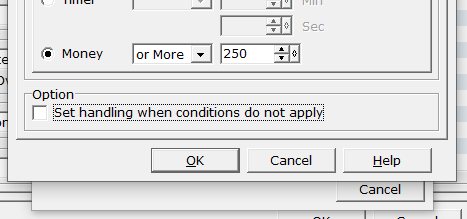
1. The first case is the default action. This will be the first event page. To cover the condition that the thief does not offer to sell anything unless Chester has at least 250G, first add a 'Fork Condition/Conditional Branch' command (tab 3, column 2). Set the condition to check as 'Money' is 250G or more. We don't need an else case here, so you can uncheck the 'set handling when conditions do not apply' option.
After that, put in whatever dialogues you want, then add the event called 'Show Choices' (tab 1, column 1) and set up 2 choices - buy and refuse. Make sure to set the correct choice number as the 'Cancel' choice on the right.

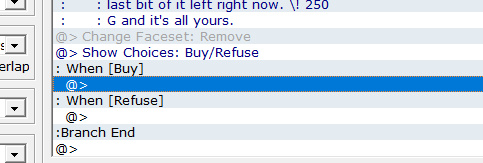
We'll begin with the easier option - Refuse. Once he refuses, we should begin triggering branch 1 (i.e., show a different message once the offer has been refused even once) on all subsequent interactions, fOrEvEr. Thus for the refuse option in the 'Choices' command, the main thing we need to do is set a particular variable to any value like, say, 1. You can also use a switch here if you want to, but I'll be going with a variable.

For the Buy choice (which will subsequently trigger branch 2), add 1 quantity of the item to your inventory ('Change Items' in tab 1, column 1), and reduce the gold amount by 250G ('Change Gold' in tab 1, column 1).

2. Let's handle all our branches now.
For branch 1, which gets triggered upon refusal to buy, create a new page and set the event condition to check the value of the variable we set in the previous page. Add in whatever other interactions or commands you'd like.

Now we can move on to branch 2. Create a new page in the event and set the event condition to check if 'Item' is in inventory. Again, add in whatever message or thief-hero interactions you want to show here.

Moving on to branch 3, create another page again, and this time, set the event condition to the same switch that we used for the item in the database (in my case, it is 'sawdust'). Put in whatever dialogue you want. I'm just going to have Chester accuse the thief of being, well, a thief, and then said thief will run away.

3. Since the thief will run away, we will need another page, with an empty graphic, in the event to 'remove' it from the map (i.e., hide it). We can do this by setting another switch or variable in branch 3, and using that to trigger this new page. I've called this new switch 'sawdustIdentified'. Set the event graphic on this page to nothing, and make sure priority is 'Below Character'. The trigger option must be set to Parallel Process.


4. As soon as you 'use' the sawdust, the game engine will automatically switch on the corresponding item switch, so this is not something we'll need to handle explicitly. Just ensure that you have at least 250G if you want to trigger any of the branches (you could set up an event nearby that gives you the gold. Kind of like a treasure chest).
And it's finished! Make sure to do a quick couple of test runs to see if all branches are working as expected.


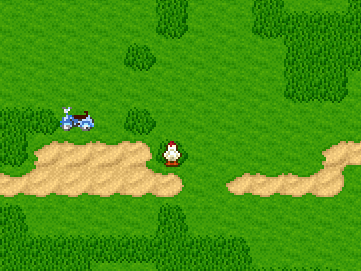
In the next post, we'll take up common events, and see how we can improve the thief event a little bit using those.
Until then,
-Wean Dinchester


Comments