
Shops And Inns
- meetthemeese

- Mar 27, 2021
- 4 min read
Updated: Oct 6, 2022
No RPG can be complete without an inn and some shops. Well, no adventure RPG, anyway. Probably.

RM2K comes with built-in(n) commands that help you set up shops and inns like regular events. If you've been following the tutorials closely, you might have set up a couple of inn/shop maps beforehand. If not, let's jump right in.
Stores
Let's create a new map for the interior of our store first. I'm making a tiny one, which sells various medicinal supplies, and is run by a cow behind a counter.


Since Chester can only speak to the shopkeeper over the counter in my set-up, I'm going to select a tile on the counter to configure the shop-event. This one -

If your shopkeeper is behind a counter, but is reachable from other directions, make sure you trigger the shop-event whenever the player clicks on the shopkeeper's sprite too.
Add the 'Shop processing...'/'Call shop...' command (tab 2, column 1) to the event, and a new dialog pops up.
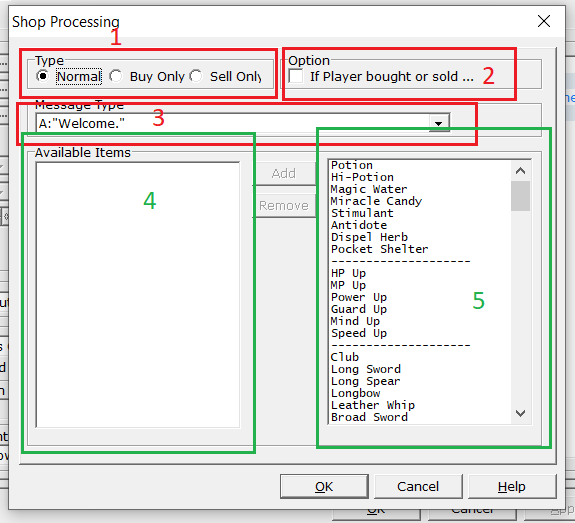
1. Type => If the player can buy only, sell only or buy and sell in this shop.
2. Options => Checking this introduces a new fork in the command, where we can add additional commands based on whether the player purchased anything or not.

3. Message Type => Here you can pick the built-in message that the shopkeeper conveys whenever you open the store menu. There are a few default messages set up in the database already as variations that you can pick from this drop-down, and we can change all of them. We'll look at that part of the database very shortly.
4. Available Items => The list of items for sale at this store.
5. These are the list of items from your database.
You click on an item from the list of items on the right, then click the 'Add' button to push it into the 'Available Items' list on the left. You can add as many items as you'd like, and add the same item multiple times too (no idea why anyone would want that).
If you want to remove an item from the shop's list, click on the item from the 'Available Items' list and press the 'Remove' button. Easy.


Once you're satisfied with the list, hit OK and save the event. Shop finished! You can run a test playthrough to see your handiwork.
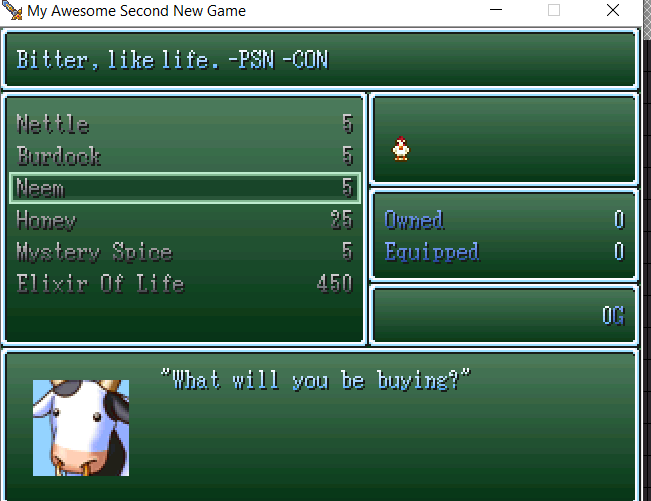
You can buy and hold at most 99 of each kind of item (even if you add the same item to the list twice, you still hit the 99 limit for that item).
Unrelated, but I made a bunch of such shops in a 'town centre' and I am showing it off here -

That's all the rations and supplies, medicines, food, weapons and hardware stores in this demo game, all in one map hehe.
The Inns And Outs Of Suspicious Bar Tending Activities
Setting up an inn is the same. You use the 'Inn processing...'/'Call inn...' command (tab 2, column 1) instead.
Here's my sad excuse for a bar/inn that's very empty.

And here's what the 'Inn processing...'/'Call inn...' command dialog looks like -

1. Message Type => Pick the message you want displayed, from the list of default messages already in the database.
2. Cost => How much a night's stay costs here.
3. Options => This also introduces a new fork in the command, where we can add additional commands based on whether the player agreed to stay at the inn or not.

Done!

If you run a test playthrough, you'll see that you're able to go through the inn sequence without problems with just that one command. You might also be wondering where that funky tune comes from that you hear during the "sleep" sequence. That's right, from the database!
In the 'System' tab of the database, you'll find a whole bunch of system-wide/game-wide settings that you can just set once, and they'll be applied throughout the game. Aside from the inn music, you can see other settings like vehicle graphics and battle and teleport transitions. We might give the tab a look-over once towards the end of the tutorial series, but it's pretty straightforward actually.

Messaging Is Key
It really isn't in RPGs though. Not from inns or shops. Though it can be. Anyways.
The 'Messages'/'Terms' tab is where we want to go next. You'll see a bunch of "glossary" tabs here, and these are where you can set up aaaaall the game-level text you want to show up in repetitive events like battles and inns.

Glossary tabs 1 & 2 are for battles, 3 & 4 are for shops and inns, and 5 is for your game's terminology and abbreviations.
The only options here that I thought looked less obvious as to where they might be used in the game were the 'Shop Parameters'. These are the strings of text that show up on the right side in a shop event in a live game.

Now, it is done. Go forth, and build your own shops!
In the next post, we'll move on to a 'turning point' in the plot, one I've mentioned in passing in a previous post. Which means we'll also see how we can update the main quest in our quest log to keep pace!
Until then,
- Meesal Pav


Comments